Objective:
- The objective of the project is to develop a system that enables election commission of India to conduct online elections.
- The purpose is to design a system that automates all the processes and activities related to elections.
- The system provides appropriate facilities for all the participating entities.
Existing System:
- In the present scenario, the election process is conducted using conventional procedures.
- Election commission officials announce a particular date for elections.
- Candidates file their nominations, which are scrutinized by officials.
- Voters register their details with authorities.
- On the polling day, voters cast their vote at the polling centers.
- Counting of votes is done and results are announced.
- All these activities involve a number of officials and the process is time consuming.
Proposed System:
- The proposed system is a web based application, which allows online polling.
- The system allows registration of voters and allows candidates to do online canvassing.
- All the processes are automated and the elections can be conducted more efficiently and effectively.
- The system provides a number of interfaces for this purpose.
- Time and effort are drastically reduced.
Study of the system:
To provide flexibility to the users, the interfaces have been developed that are accessible through a browser. The GUI’S at the top level have been categorized as
- Administrative user interface
- The operational or generic user interface
The ‘administrative user interface’ concentrates on the consistent information that is practically, part of the organizational activities and which needs proper authentication for the data collection. These interfaces help the administrators with all the transactional states like Data insertion, Data deletion and Date updation along with the extensive data search capabilities.
The ‘operational or generic user interface’ helps the end users of the system in transactions through the existing data and required services. The operational user interface also helps the ordinary users in managing their own information in a customized manner as per the included flexibilities.
Feasibility Study:
Feasibility Report:
Preliminary investigation examines project feasibility, the likelihood the system will be useful to the organization. The main objective of the feasibility study is to test the Technical, Operational and Economical feasibility for adding new modules and debugging old running system. All systems are feasible if they are given unlimited resources and infinite time. There are aspects in the feasibility study portion of the preliminary investigation:
- Technical Feasibility
- Operation Feasibility
- Economical Feasibility
Technical Feasibility:
The technical issue usually raised during the feasibility stage of the investigation includes the following:
- Does the necessary technology exist to do what is suggested?
- Do the proposed equipments have the technical capacity to hold the data required to use the new system?
- Will the proposed system provide adequate response to inquiries, regardless of the number or location of users?
- Can the system be upgraded if developed?
- Are there technical guarantees of accuracy, reliability, ease of access and data security?
Operational Feasibility:
Proposed projects are beneficial only if they can be turned out into information systems, which will meet the organization’s operating requirements. Operational feasibility aspects of the project are to be taken as an important part of the project implementation. Some of the important issues raised are to test the operational feasibility of a project includes the following: –
- Is there sufficient support for the management from the users?
- Will the system be used and work properly if it is being developed and implemented?
- Will there be any resistance from the user that will undermine the possible application benefits?
This system is targeted to be in accordance with the above-mentioned issues. Beforehand, the management issues and user requirements have been taken into consideration. So there is no question of resistance from the users that can undermine the possible application benefits.
The well-planned design would ensure the optimal utilization of the computer resources and would help in the improvement of performance status.
Economic Feasibility:
A system can be developed technically and that will be used if installed must still be a good investment for the organization. In the economical feasibility, the development cost in creating the system is evaluated against the ultimate benefit derived from the new systems. Financial benefits must equal or exceed the costs. The system is economically feasible. It does not require any additional hardware or software.
Functional Requirements:
Number of Modules
After careful analysis the system has been identified to have the following modules:
- Authentication and Security Module
- Political parties Module
- Member Assets Module
- Party Campaign Module
- Election Module
- Reports Module
1. Authentication and Security Module
This module allows voters to register their details and obtain a voter id card.
2. Political Parties Module
This module provides details of each political party participating in the elections. Party symbol, party nominated candidates, constituency details and other information is provided.
3. Member Asset Module:
This module provides details of assets held by the candidates. For each candidate ones professional details are maintained.
4. Party Campaign Module:
This module maintains details of all political parties and details of candidates. The information about campaigners, cost involved and procedures are also specified. The nomination details of each candidate are available. The election officer details are also included.
5. Elections Module:
This module is used to present election schedules as prepared by election commission authorities.
6. Reports Module
This module allows generation of reports based on various criteria.
Non-Functional Requirements:
Software requirements:
Operating System : Windows
Technology : Java and J2EE
Web Technologies : Html, JavaScript, CSS
IDE : My Eclipse
Web Server : Tomcat
Database : Oracle
Java Version : J2SDK1.5
Hardware requirements:
Hardware : Pentium
RAM : 1GB
Input Design:
Input design is a part of overall system design. The main objective during the input design is as given below:
- To produce a cost-effective method of input.
- To achieve the highest possible level of accuracy.
- To ensure that the input is acceptable and understood by the user.
Input Stages:
The main input stages can be listed as below:
- Data recording
- Data transcription
- Data conversion
- Data verification
- Data control
- Data transmission
- Data validation
- Data correction
Input Types:
It is necessary to determine the various types of inputs. Inputs can be categorized as follows:
- External inputs, which are prime inputs for the system.
- Internal inputs, which are user communications with the system.
- Operational, which are computer department’s communications to the system?
- Interactive, which are inputs entered during a dialogue.
Input Media:
At this stage choice has to be made about the input media. To conclude about the input media consideration has to be given to;
- Type of input
- Flexibility of format
- Speed
- Accuracy
- Verification methods
- Rejection rates
- Ease of correction
- Storage and handling requirements
- Security
- Easy to use
- Portability
Keeping in view the above description of the input types and input media, it can be said that most of the inputs are of the form of internal and interactive. As
Input data is to be the directly keyed in by the user, the keyboard can be considered to be the most suitable input device.
Output Design:
Outputs from computer systems are required primarily to communicate the results of processing to users. They are also used to provide a permanent copy of the results for later consultation. The various types of outputs in general are:
- External Outputs whose destination is outside the organization.
- Internal Outputs whose destination is with in organization and they are the User’s main interface with the computer.
- Operational outputs whose use is purely with in the computer department.
- Interface outputs, which involve the user in communicating directly with the system.
Output Definition
The outputs should be defined in terms of the following points:
- Type of the output
- Content of the output
- Format of the output
- Location of the output
- Frequency of the output
- Volume of the output
- Sequence of the output
It is not always desirable to print or display data as it is held on a computer. It should be decided as which form of the output is the most suitable.
For Example
- Will decimal points need to be inserted
- Should leading zeros be suppressed.
Output Media:
In the next stage it is to be decided that which medium is the most appropriate for the output. The main considerations when deciding about the output media are:
- The suitability for the device to the particular application.
- The need for a hard copy.
- The response time required.
- The location of the users
- The software and hardware available.
Keeping in view the above description the project is to have outputs mainly coming under the category of internal outputs. The main outputs desired according to the requirement specification are:
The outputs were needed to be generated as a hard copy and as well as queries to be viewed on the screen. Keeping in view these outputs, the format for the output is taken from the outputs, which are currently being obtained after manual processing. The standard printer is to be used as output media for hard copies.
SDLC Methodology:
This document play a vital role in the development of life cycle (SDLC) as it describes the complete requirement of the system. It means for use by developers and will be the basic during testing phase. Any changes made to the requirements in the future will have to go through formal change approval process.
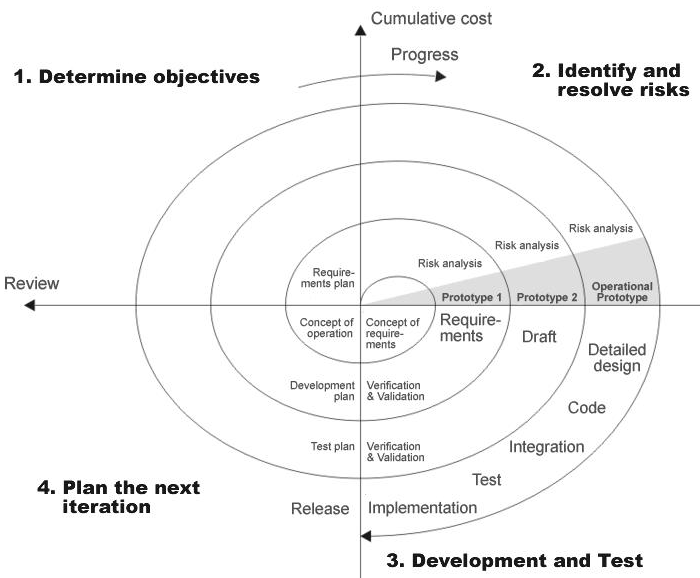
SPIRAL MODEL was defined by Barry Boehm in his 1988 article, “A spiral Model of Software Development and Enhancement. This model was not the first model to discuss iterative development, but it was the first model to explain why the iteration models.
As originally envisioned, the iterations were typically 6 months to 2 years long. Each phase starts with a design goal and ends with a client reviewing the progress thus far. Analysis and engineering efforts are applied at each phase of the project, with an eye toward the end goal of the project.
The steps for Spiral Model can be generalized as follows:
- The new system requirements are defined in as much details as possible. This usually involves interviewing a number of users representing all the external or internal users and other aspects of the existing system.
- A preliminary design is created for the new system.
- A first prototype of the new system is constructed from the preliminary design. This is usually a scaled-down system, and represents an approximation of the characteristics of the final product.
- A second prototype is evolved by a fourfold procedure:
- Evaluating the first prototype in terms of its strengths, weakness, and risks.
- Defining the requirements of the second prototype.
- Planning an designing the second prototype.
- Constructing and testing the second prototype.
- At the customer option, the entire project can be aborted if the risk is deemed too great. Risk factors might involved development cost overruns, operating-cost miscalculation, or any other factor that could, in the customer’s judgment, result in a less-than-satisfactory final product.
- The existing prototype is evaluated in the same manner as was the previous prototype, and if necessary, another prototype is developed from it according to the fourfold procedure outlined above.
- The preceding steps are iterated until the customer is satisfied that the refined prototype represents the final product desired.
- The final system is constructed, based on the refined prototype.
- The final system is thoroughly evaluated and tested. Routine maintenance is carried on a continuing basis to prevent large scale failures and to minimize down time.
The following diagram shows how a spiral model acts like:
Advantages:
- Estimates(i.e. budget, schedule etc .) become more relistic as work progresses, because important issues discoved earlier.
- It is more able to cope with the changes that are software development generally entails.
Software engineers can get their hands in and start woring on the core of a project earlier
Performance Requirements:
Performance is measured in terms of the output provided by the application. Requirement specification plays an important part in the analysis of a system. Only when the requirement specifications are properly given, it is possible to design a system, which will fit into required environment. It rests largely with the users of the existing system to give the requirement specifications because they are the people who finally use the system. This is because the requirements have to be known during the initial stages so that the system can be designed according to those requirements. It is very difficult to change the system once it has been designed and on the other hand designing a system, which does not cater to the requirements of the user, is of no use.
The requirement specification for any system can be broadly stated as given below:
- The system should be able to interface with the existing system
- The system should be accurate
- The system should be better than the existing system
The existing system is completely dependent on the user to perform all the duties.
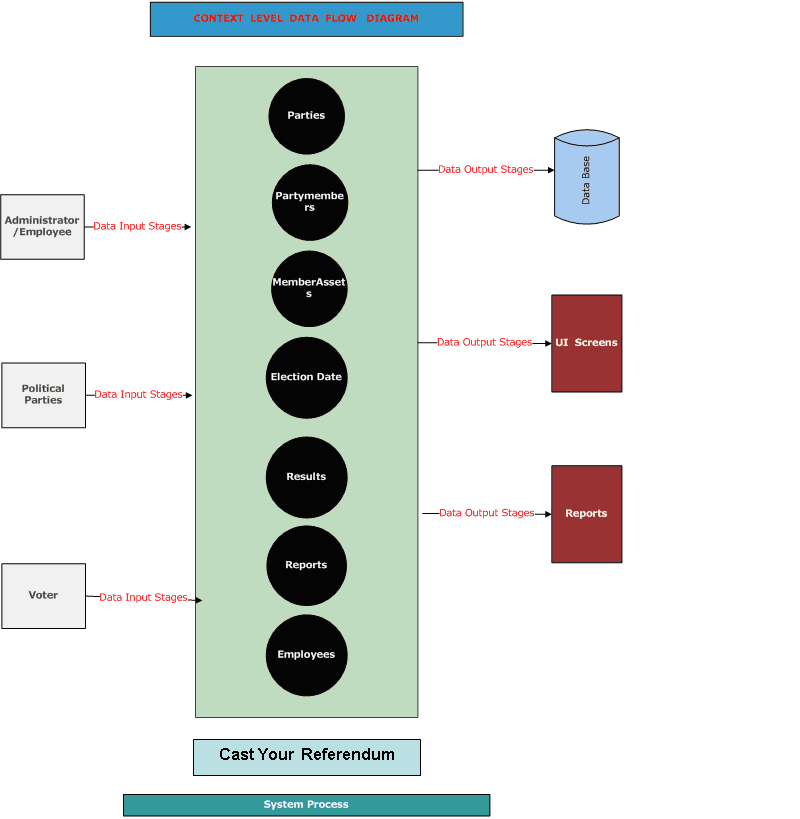
DFD (Context level Diagram):
Architecture flow :(N-Tier)
N-Tier Applications can easily implement the concepts of Distributed Application Design and Architecture. The N-Tier Applications provide strategic benefits to Enterprise Solutions. While 2-tier, client-server can help us create quick and easy solutions and may be used for Rapid Prototyping, they can easily become maintenance and security night mare The N-tier Applications provide specific advantages that are vital to the business continuity of the enterprise. Typical features of a real life n-tier may include the following:
- Security
- Availability and Scalability
- Manageability
- Easy Maintenance
- Data Abstraction
The above mentioned points are some of the key design goals of a successful n-tier application that intends to provide a good Business Solution.
Definition:
Simply stated, an n-tier application helps us distribute the overall functionality into various tiers or layers:
- Presentation Layer
- Business Logic layer
- Data Link Layer
- Database/Data Store
Each layer can be developed independently of the other provided that it adheres to the standards and communicates with the other layers as per the specifications. This is the one of the biggest advantages of the n-tier application. Each layer can potentially treat the other layer as a ‘Block-Box’. In other words, each layer does not care how other layer processes the data as long as it sends the right data in a correct format.
Fig: N-Tier Architecture
- Presentation Layer:
Also called as client layer, comprises of components that are dedicated to presenting the data to the user. For example: Windows/Web Forms and buttons, edit boxes, Text boxes, labels, grids, etc.
- Business Logic Layer:
This layer encapsulates the Business rules or the business logic of the encapsulations. To have a separate layer for business logic is of a great advantage. This is because any changes in Business Rules can be easily handled in this layer. As long as the interface between the layers remains the same, any changes to the functionality/processing logic in this layer can be made without impacting the others. A lot of client-server apps failed to implement successfully as changing the business logic was a painful process.
- Data Link Layer:
This layer comprises of components that help in accessing the Database. If used in the right way, this layer provides a level of abstraction for the database structures. Simply put changes made to the database, tables, etc do not affect the rest of the application because of the Data Access layer. The different application layers send the data requests to this layer and receive the response from this layer.
- Database Layer:
This layer comprises of the Database Components such as DB Files, Tables, Views, etc. The Actual database could be created using SQL Server, Oracle, Flat files, etc. In an n-tier application, the entire application can be implemented in such a way that it is independent of the actual Database. For instance, you could change the Database Location with minimal changes to Data Access Layer. The rest of the Application should remain unaffected